Skip to content
CovaSyn
Book an initial call

Sketcher

“We want to do something with AI but do not know where to start.”

Analyse molecules without installing anything.

Draw a structure and instantly see formula, molecular weight and SMILES, free and without signing in. Test spectra, stability and toxicology on the same molecule for free with an account: the simplest way to find out what AI does for your chemistry.

30 minutes on Microsoft Teams with the CovaSyn team. If it is not a fit, we will say so.

Data sheetCaffeine
Formula
C8H10N4O2
Monoisotopic mass
194.080 Da
logP (Crippen)
-1.03
TPSA
61.8 Ų
H-bond donors / acceptors
0 / 6
Computed from the SMILES with RDKit 2025.03.4.

Try it right here

Draw a structure.

Formula, molecular weight and canonical SMILES appear instantly, free and without signing in. Spectra, stability, toxicology and synthesis routes on the same molecule open up with a free account.
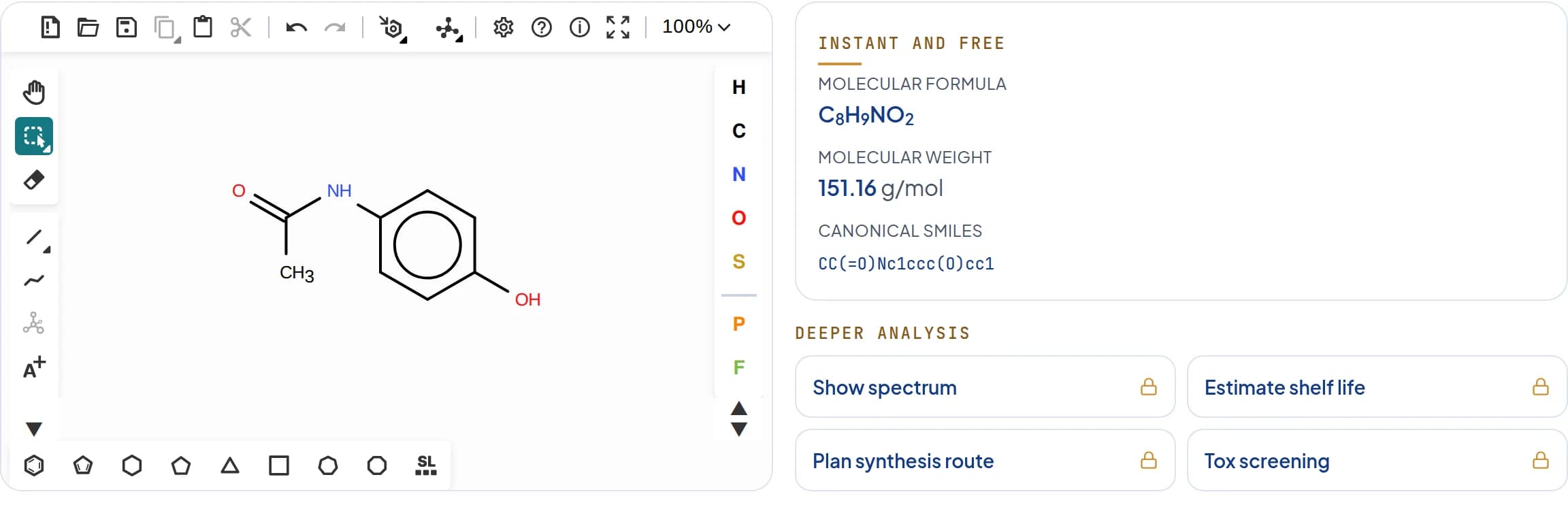
Sketcher preview with paracetamol: structure editor on the left, formula C8H9NO2, molecular weight 151.16 g/mol and canonical SMILES on the right.

Doing research or teaching at a university? Universities and research institutes can apply for the academic programme.

If nothing changes

What it costs when every structure question has to wait.

  • Structure questions end up with the one person who can run the specialist software.
  • A quick check turns into a licence request, an installation and a setup.
  • Whether AI is any good for your chemistry remains a guess.

How we help

How to work with the sketcher.

You draw in the browser, the analysis appears next to it. To go deeper, create a free account and get spectra, stability, toxicology and synthesis on the same molecule.

  1. 01

    Draw

    Sketch a structure in the browser or paste a SMILES.

  2. 02

    Check

    Formula, molecular weight and SMILES appear right next to it.

  3. 03

    Go deeper

    With a free account, spectra, stability, toxicology and synthesis on the same molecule.

Save time
A result in seconds instead of installation, licence request and onboarding.
Save costs
Free to use, no licence and no IT setup needed.

Proof

Measured, not claimed.

AI models alone
14 to 41%
With CovaSyn tools
76 to 92%
MolecularIQ, arXiv:2601.15279. Method and data

Free or with an account

What is free and what the account adds.

With a free account, the preview becomes CovaSketch: the same editor plus the full CovaSyn analytics. The numbers come from the tools, not from a language model.

Free, no sign-in

  • Draw a structure in the browser or paste a SMILES.
  • Formula, molecular weight and canonical SMILES right next to it.
  • Permanently free, no sign-in and no installation.

With a free account

  • The Ketcher 3.12 structure editor, structures unambiguous and reusable as SMILES.
  • Properties, spectra, stability, toxicology and retrosynthesis on the same molecule, one right-click away.
  • Trade names and patents for the structure you drew, via PubChem.
  • An AI assistant in the editor that calls the CovaSyn tools for every number. You review the wording like any draft.
  • Every step lands in the notebook, recorded with its tool version and reproducible.

Analytics

The analyses behind the right-click.

One drawn structure, the full CovaSyn analytics. The tool overview shows which tools are behind it.

  • Physicochemistry

    pKa, LogP and further physicochemical properties.

  • Solubility and formulation

    Solubility, miscibility, pH curves, antisolvent.

  • ADMET and safety

    ADME, druglikeness, ICH M7, Tox21, structural alerts.

  • Spectra

    Predict NMR, MS and IR for the structure you drew.

  • Stability

    Arrhenius kinetics, shelf life, OOS and OOT.

  • Docking and binding

    Docking, binding poses, refinement.

See the tool overview

Who it is for

For everyone who works with structures.

From the first idea to regulatory documentation.

  • Medicinal chemistry and drug discovery

    Draw candidates, assess ADMET and druglikeness early, plan retrosynthesis.

  • Formulation and process

    Keep solubility, stability, shelf life and physicochemical properties in view.

  • Analytics and regulatory

    Predict spectra, verify identity and purity, document ICH M7 risks defensibly.

FAQ

Frequently asked questions

Do I need an account?

No. Drawing and the basic analysis with formula, molecular weight and SMILES are free and need no sign-in. For spectra, stability, toxicology and synthesis you create a free account.

Does the sketcher cost anything?

No, the sketcher is free to use. You see the prices for the tools in the workspace after signing in.

How is the sketcher different from the tools?

The sketcher is the entry point in the browser. The tools bring the analyses into Claude, ChatGPT or Cursor via MCP, where your team already works.

How reliable are the results?

14 to 41% without CovaSyn, 76 to 92% with CovaSyn. Measured on MolecularIQ, a benchmark we did not design (arXiv:2601.15279, Klambauer Lab, Institute for Machine Learning, JKU Linz). Every result is a first draft that your experts sign off.

What is CovaSketch?

The full version of the sketcher in your free account: a lab notebook built around the molecule. You draw the structure, analyse it with the CovaSyn analytics and document every step reproducibly. Behind it are the same tools as in the CovaSyn MCP server.

Which editor does the sketcher use?

The research-grade Ketcher 3.12 structure editor. Structures are unambiguous and reusable as SMILES.

What can I analyse with an account?

pKa, LogP, NMR, ADMET, ICH M7, stability, retrosynthesis, docking and more. All via the CovaSyn tools, one right-click away. The computed values are deterministic: same structure, same result.

Where does my data run?

On the CovaSyn platform: Hosted at Hetzner in Nuremberg, data kept in the EU, operated under GDPR. No training on your data. If everything should run in-house, that is part of Done-for-You: Systems.

Next step

Draw your first molecule.

Right in your browser, no sign-in and no installation. When you need more, the tools are one click away.